



How To Rent & Operate A Kiosk:
In Just A Few Simple Steps:
Tap Rent a Power Bank
Complete secure payment
Remove your charger
Charge on the go
Return to a Catch a Charge kiosk
You're done!
Power up in minutes. Tap. Pay. Charge. Return.
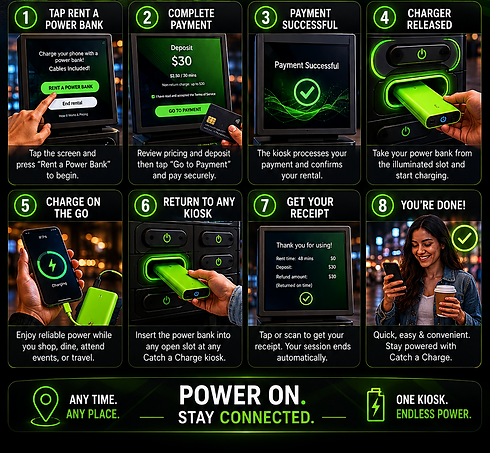


How To Rent & Operate A Kiosk:
Staying charged on the go is quick and easy with Catch A Charge.
Step 1 - Start Your Rental:
Tap the kiosk screen and select “Rent a Power Bank” to begin.
Step 2 -Review Pricing & Continue:
The kiosk will display rental pricing and deposit details. Tap “Go to Payment” to proceed.
Step 3 - Complete Payment:
Pay securely using your preferred payment method: Credit / Debit Card, Mobile Wallet Payments Contactless, Payment Options.
Step 4 - Processing Confirmation:
Once payment is approved, the kiosk will process your rental automatically.
Step 5 - Grab Your Charger:
Your portable battery charger will be released from the kiosk. Simply remove it and start charging your device immediately.
Step 6 - Charge Anywhere:
Take your charger with you and stay powered while shopping, dining, attending events, or enjoying your day
Step 7 - Return When Finished:
When you're done, return the charger to any available Catch a Charge kiosk location by inserting it into an open slot.
Step 8 - Rental Complete:
Once returned, your session ends automatically, and any applicable deposit adjustment is processed according to your rental terms